If you are a vibe coder, read this 👀
It has been almost 1.5+ years since the launch of Claude Code, and things have changed drastically. Developers are not coding by hand anymore. Anyone with a few AI tools can build and ship apps in a day or two. The term “vibe coding” has been everywhere over the past year.
I am a software developer who has been working in the field for years now, and I have seen coding by hand shift to coding with AI agents 🤖. But for vibe coders or non-technical people with great ideas, there are a few things no one is telling them to follow while building apps with vibe coding. So I thought I’d write a brief post about the practices vibe coders should follow to build world-class products and apps 🛠️.
In this post, we will build a small chat app 💬 using vibe coding. I will keep it as non-technical as possible so anyone without coding knowledge can build small apps that hold real value for themselves or others. ✨
Select the tools wisely 🧰
Let’s start with the first thing, before building anything, you need to understand where to start. Any app you see in the world runs on programming languages. But before even that, you need to choose what AI tools to use. It really depends on what you are building. Maybe just one tool will be able to build it, or you might need more than one tool to build the app 🔍.
You can directly ask AI, and it will tell you what the best option for building your app will be. After choosing an AI tool, the first technical choice you need to make before you start building is selecting the programming language. In the real world, highly scalable software needs technical knowledge to select the right tools for an app. For example, if you are building a website with some information about your business, you can select React.js ⚛️.
For tool choices, try having some conversation about your idea with AI. Ask AI to compare things and rank them. Some things you can consider:
- Is this language/tool well-maintained?
- Does this tool have open-source or pre-built options you can use?
- Will this scale when the user base grows?
- Will cost/hosting be manageable with this?
Just rank them as above. Even if you aren’t technical, at least ranking the points above will give you some clarity on whether you need to choose something or not. And nowadays, LLMs are more than capable of selecting these tools for at least medium-scale apps.
For our chat app, let’s say we choose React JS + Node.js. Do not worry about it—let AI handle it if the above makes you even a little bit confused. If you’re building an app for yourself or a small group of people, this stuff doesn’t matter as much. The end goal is just that the app should load and work! 🏃
Apart from the above, there are some things you need to select if you’re working with tools like Claude Code, like MCPs and Skills – tools that will help your agents become more productive for your app. Do not install random tools in the app. Rather, select and install only the things needed for your app 🎯.
For example, for our chat app, we can maybe add skills related to building a good UI in React JS 🎨.
Understand, divide and conquer 🧩
Understand what you need to build first. What different components/pages/features your website/app will have. Write them down. Then the next step is to divide and conquer. Assume a chat app is a big app which can be divided into small parts—like a user page from where a user can update information, a chat page where you can chat ☀️, etc. Divide your big problem into smaller ones, build them one by one, and then merge them to have the whole thing. Luckily, LLMs will easily help you in this case.
Rather than asking Claude Code something like: Bro, build a chat app.
We will ask something like: Need to build a chat app with functions for chats, group creations, user profile updates, etc.
Chat 1: Build the user login page
Chat 2: Build a chat page
Chat 3: Build the functions in the app from where the user can create a group
Chat 4: Build the function to invite the user to the app
……..
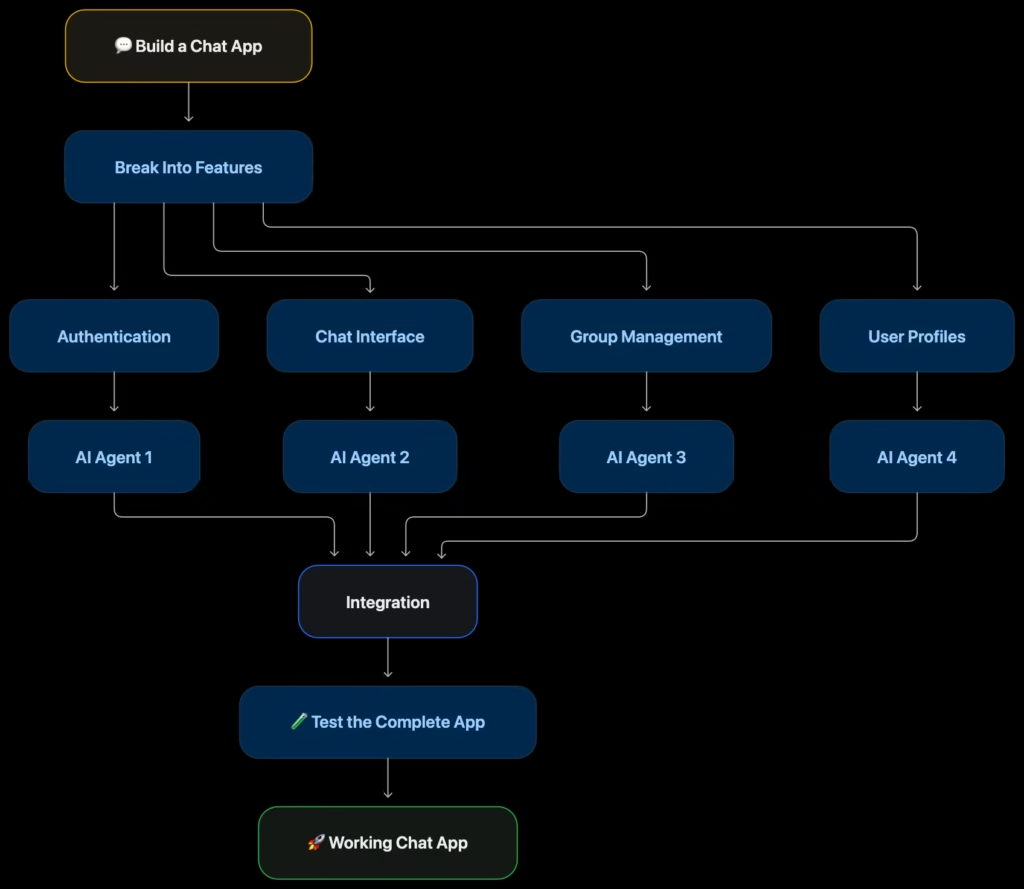
Now it’s up to you whether you just want to copy-paste all things into a chat and wait for the agent to build it on its own. If you have unlimited tokens, paste everything and ask the agent to divide the work and use multiple agents to build it. Or just open multiple sessions and start building things one by one. At the end, you will have a merged app with all features.
Testing is key 🧪
Now the next part is to make sure the app built by the agent is working. Mostly nowadays harnesses are very capable of at least writing an app that will work for the most part on the first try. But as you add more and more features to the app, testing will become key.
By default, you can provide browser access to agents so they can check the website, find bugs, and fix them automatically 🐛. Make sure your agents have all the access they need so they can fix many things on their own. Ask agents to write test cases from the start. Assume a test case is a set of instructions/cases for your app that agents can run each time after changing something to make sure no old code breaks ✅. But all things have limitations and agents will make mistakes at some point, so make sure you also give it a try and test things.
One of the best things you can do is just provide your app to someone else and ask them to use it for some time. Believe me, a 3rd party using your app is the best testing you can have to make your app more and more stable.
Monitoring is everything 📊
Assume there’s a cricket match going on and a review goes to the 3rd umpire to decide if a player is out or not 🏏. Now just think about a case where the 3rd umpire doesn’t have any video of the ball. How would he be able to decide whether the batsman is out or not? Don’t you think a 3rd umpire wouldn’t even be needed if we didn’t have data for him to check?
The same thing applies to any app we build with code. Let’s say we successfully build the chat app, but for some users, they are unable to send chats at random times. Now just take 2 minutes and think about what prompt you will say to your agents. And how can agents debug and fix it?
To debug this type of issue, you need data. Data is key. For example, let’s say you ask an agent to build a system that stores failed requests somewhere—like when User 1 is unable to send a message, it gets recorded somewhere in the system with details. And that’s it—now agents can check it and try to fix it, as they now have the information needed to resolve the issue.
These are the factors you need to consider while building an app. Just think about how this feature can break, what information you can store for it, or at least ask the agent to store the information needed to fix any bug in the system.
Above is just one example – if you have data on how your user is using the app, it will help you improve your user experience in the end. Again, data is key.
Costing is an unavoidable factor 💰
In the end, everything comes down to this point. Even from the start with the agent you are using. How much is it costing you? How can you optimize it? For the app you build, how much will it cost to host it where anyone can access it?
That’s one of the main factors in building anything. Make sure the tools you choose are cost-effective for your case. Unless you are someone who is just vibe coding with unlimited tokens and tools 💸.
For small apps, this does not matter as much. You can use any AI agent harness and hosting platform. There are many companies that provide free app hosting. But if you are building a high-scale app, make sure to consider costs for all the tools you choose. Even while using tools like Claude Code, make sure to read their docs or ask Claude to suggest best practices to burn fewer tokens. With time, you will understand how important cost is in software.
Understand the Loop of building 🔄
All the things we discussed up to this point – from building new features to testing, adding monitoring, and fixing bugs – are a continuous loop for any system. And believe me, no software is perfect. Everything you see online needs maintenance. If we build a chat app today, it will never be like you can host and never touch again. These are the main tasks you need to do continuously to build and maintain the stability of an app.
So have patience, it’s a loop, and enjoy the process. If an app built by you saves you even 2 hours daily, then it’s worth infinite to you as time is money. Keep building, keep annoying LLMs to fix/add features, and build something great with vibes.
With all these factors above, learning is everything. Make sure your agent maintains memory of past mistakes, and make sure you don’t repeat the same mistakes either. In the end, learning → building → testing → fixing → learning… is the continuous loop once you start building software apps.

Bye-bye and happy vibe coding! 👋✨