Introducing Frappe User Switch
I have been working with Frappe for a long time, and today, I am excited to share a small app I built to improve productivity in local environments by allowing multiple user logins simultaneously in Frappe.
What is Frappe?
Frappe is a low-code, no-code framework and the backbone of the famous open-source ERP ERPNext.
What is Frappe User Switch?
By default, Frappe does not support multiple user logins in the same browser session.
Since Frappe is primarily used in ERPNext solutions, system testing often requires multiple user roles to check whether a given user has access to specific resources. However, testing with multiple user accounts locally can be quite challenging.
Common workarounds include using Firefox Containers, Chrome Profiles, or different browsers to log in with different user accounts in separate sessions.
In the worst-case scenario, you might have to open multiple incognito windows for each user, making your computer look cluttered with numerous browser windows.

Frappe User Switch reduces the hassle, at least on local or staging sites, for testing.
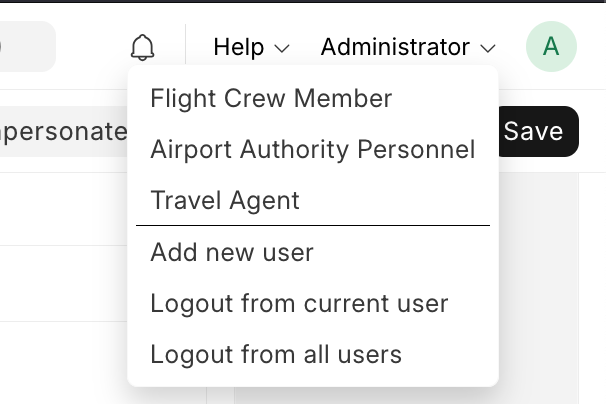
It simplifies the process by allowing users to log in with multiple accounts simultaneously within a single browser session.
Something like this:
⚠️ Warning: Since this method bypasses Frappe’s default authentication flow, it should only be used for local testing and debugging, not in production.
How Does It Work Behind the Scenes?
Let’s understand how Frappe’s default authentication flow works. Check out the diagram below, which illustrates the default user authentication process in Frappe.

This is how Frappe’s default authentication works.
- The user enters their username and password.
- Frappe validates the password and creates a user session with a session ID (sid). This sid is used to identify the user session, and Frappe stores it both in the cache and the database.
- The sid is then set as a cookie in the user’s browser.
- On the next request to access a resource on the site, the sid is sent as a cookie in the request headers.
- Frappe checks if the sid exists in the cache. If it is not found in the cache, it checks in the database.
- If the sid is found, Frappe creates a session object, which is stored globally at runtime for the given request as frappe.session.
- If the sid is not found, Frappe treats the request as a guest session and sets frappe.session.user as Guest.
Now, with this strict one SID per browser session, how does Frappe User Switch work ?
It’s simple! Frappe User Switch has its own way of managing SIDs.
I have overridden Frappe’s default SID storing process by introducing a JWT token called User Token. This token acts as an object that stores the SID and user mapping, allowing seamless switching between multiple users within the same browser session.
The Change Process
- On every page load, an API call is made to
frappe_user_switch. - The endpoint updates the token if a new SID is received or checks for the previous SID.
- If the session does not exist or has been removed by Frappe, it creates a new session for the given user with the same SID.
- The SID cookie is updated based on the user action—whether adding a new user or switching users.

Use the app today and speed up your local testing! 🚀, This is strictly for local use and not for production site.
Repo Link: