What Happens When You Type localhost 🤔 ?
So, every web developer journey starts with localhost and probably will end with running that last localhost app only. Localhost server is something we use all day in our life. But most people do not understand how this localhost works.
Some questions you should have in mind if you are reading this post are.
- What is even a localhost?
- How does every system have their own localhost server?
- How it is diff from any other website like google.com.
Also hear a short summer video of our discussion do check it out as well 🙃:
Let’s get started now 🏃.
Let’s understand how this process works with x.com.
Before understanding how localhost works let’s understand how the internet works in general when you visit any site. assume we are making req to x.com.
Here is a curl output of given site.
➜  ~ curl  x.com

<html>

<head><title>301 Moved Permanently</title></head>

<body>

<center><h1>301 Moved Permanently</h1></center>

<hr><center>cloudflare</center>

</body>

</html>

➜  ~
We got a HTML response here. Let’s try to ping the same domain.
➜  ~ ping x.com

PING x.com (162.159.140.229): 56 data bytes

64 bytes from 162.159.140.229: icmp_seq=0 ttl=57 time=35.119 ms

64 bytes from 162.159.140.229: icmp_seq=1 ttl=57 time=29.969 ms

64 bytes from 162.159.140.229: icmp_seq=2 ttl=57 time=44.656 ms

➜
One thing to notice here is that ping is sending data packets to a given address: 62.159.140.229. But our domain name is x.com. Then where the address came from and why we are communicating with a given address rather than x.com 🤔?.
Ans is simple, the x.com is domain name and 62.159.140.229 is IP of this domain. Computers or any network device in general talk with respect to IP. Each domain name is mapped to one IP and based on that IP the host machine makes the connection to the server of x.com.
Check out the below diagram to understand this in detail.
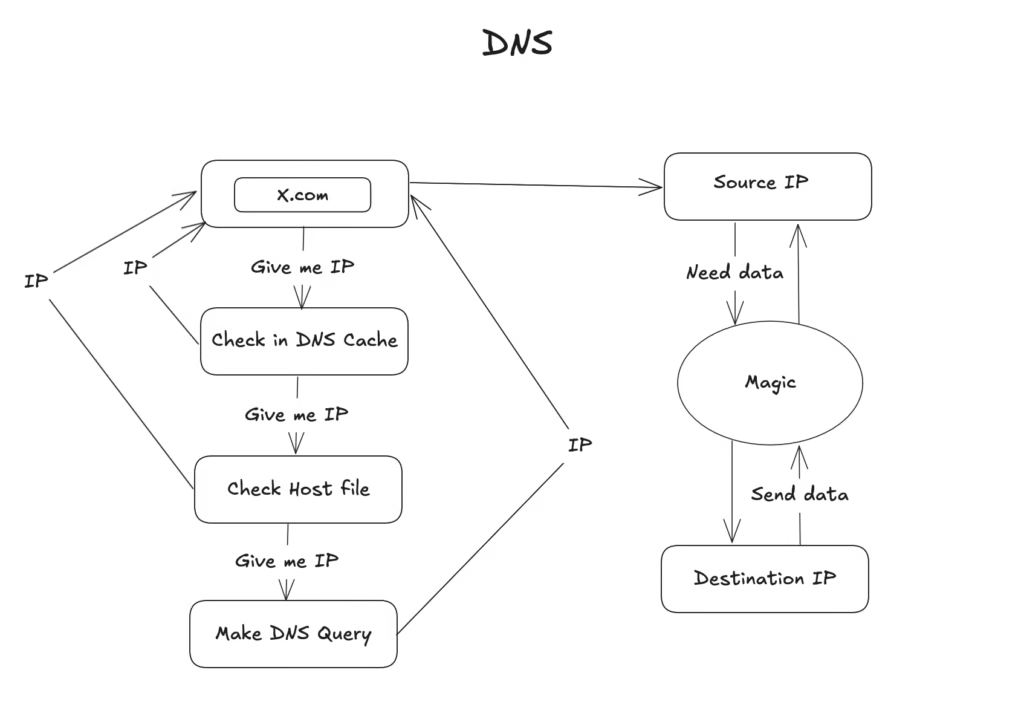
So this is what happens when you type x.com in the browser:
- A host machine/computer take the domain and ask for IP.
- Fist it check in cache if IP of that domain exists or not, if exists then it return IP or else continue to 3.
- Each computer has one host file which stores the domain and IP map.(~/etc/hosts), if domain exists in this file then it return IP or else continue to 4.
- If IP is not found in cache as well in host file than system make a DNS query to fetch the IP of domain.
- After getting IP of destination host or x.com, We have source IP (your computer IP) and destination IP (x.com IP), so now data is transferred with networking. Let’s assume it is magic as the focus of this post is to understand localhost working.
I have found a website which shows all DNS server for given IP do check it out: DNSChecker
So in short, you enter x.com in the computer, then the computer checks in cache and in the host file if it does not find an IP then it makes a DNS query to fetch the IP of x.com. Here you can see we are checking the outside computer to get the IP and host and destination are not in the same place 😀.
Let’s understand how this process works with localhost.
First, let’s try to curl localhost.
➜  ~ curl http://localhost:5173/

<!doctype html>

<html lang="en">

  <head>

    <script type="module">import { injectIntoGlobalHook } from "/@react-refresh";

injectIntoGlobalHook(window);

window.$RefreshReg$ = () => {};

window.$RefreshSig$ = () => (type) => type;</script>

    <script type="module" src="/@vite/client"></script>

    <meta charset="UTF-8" />

    <link rel="icon" type="image/svg+xml" href="/vite.svg" />

    <meta name="viewport" content="width=device-width, initial-scale=1.0" />

    <title>Test</title>

  </head>

  <body>

    <div id="root">ModuleZP</div>

    <script type="module" src="/src/main.jsx"></script>

  </body>

</html>

➜  ~
Let’s make a ping req for the same.
➜  ~ ping localhost

PING localhost (127.0.0.1): 56 data bytes

64 bytes from 127.0.0.1: icmp_seq=0 ttl=64 time=0.124 ms

64 bytes from 127.0.0.1: icmp_seq=1 ttl=64 time=0.195 ms

➜  ~
If you look carefully, things are the same, like curl has got the response with HTML and ping is also able to make a request to IP 127.0.0.1. Then how does it even diff.
Let’s understand how it is working with diagram.
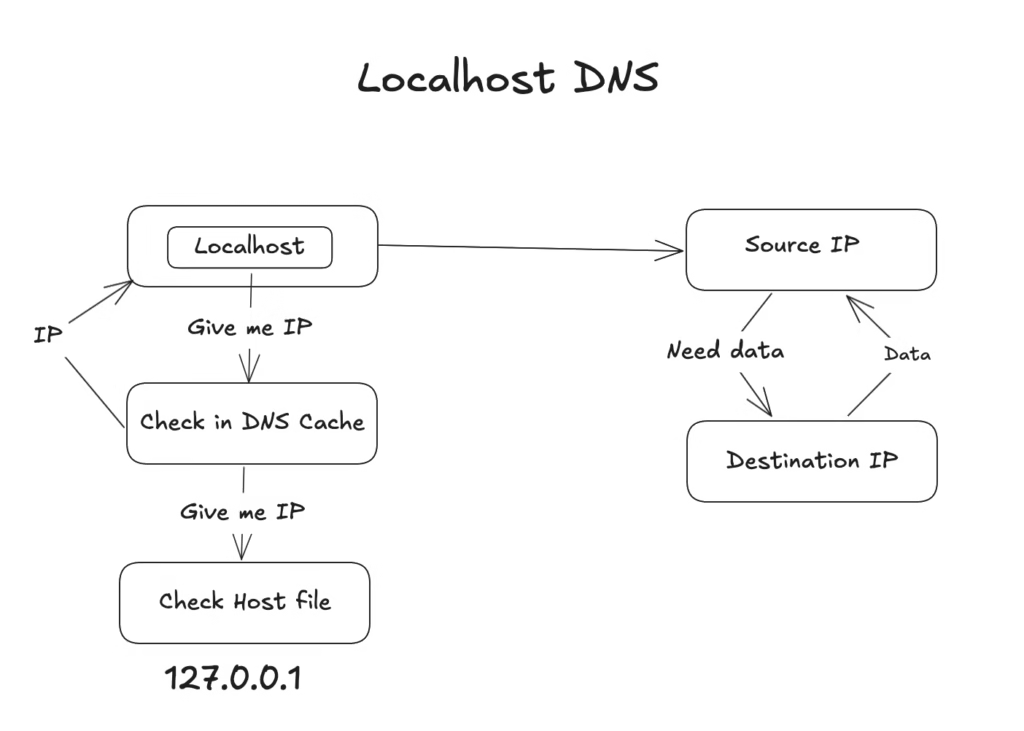
So this is what happens when you type localhost in browser:
- A host machine/computer take the domain and ask for IP.
- Fist it check in cache if IP of that domain exists or not, if exists then it return IP or else continue to 3.
- Each computer has one host file which stores the domain and IP map.(~/etc/hosts), if domain exists in this file then it returns IP or else return IP not found.
Here as you can see DNS query is not made. Computer check in host file for IP of localhost. And all computers by default will have an entry for localhost in the host file. And IP will always be fixed 127.0.0.1.
Check out the contents of the host file.
➜  ~ cat /etc/hosts

127.0.0.1    localhost

➜
Here IP 127.0.0.1 is the main thing, localhost is just a domain name same as x.com. Each computer has this IP for its own local server. When req is made to this IP, Computer avoid the networking and send the data to its own system for the running process at a given port.
Localhost is just a name here. It maps to IP 127.0.0.1 and it finds process in the same computer.
What if you remove the entry of localhost from the host file?
- It is just a name, if you remove it then localhost IP will not be found and your computer given you server not found error. You have to access content with IP: 127.0.0.1 in this case.
What if I add one more entry with the same IP in the host file?
- You can add as many entries as you want for a given IP in the system. It will work the same as localhost.
That’s it for this, Now you know localhost is not some magic 🍁.
I have a full tutorial on the OSI model which is the base of all this. Do check it out also.
TLDR;
Life will only get better if you fix your own mistake first within your limits rather than roaming around in another world to fix it, same how fixing errors in localhost is way more easy then fixing them on live site.Bye…