What Is a Token in LLMs?
Yo Yo Yo…… 👋
From ChatGPT’s very first chat launch to this point, where we now have agentic systems, we have come so far. Now building something is just one prompt away, and the agent itself handles everything. But with all of this, there is one core thing every person needs to understand: what is a token? It sounds like a very basic thing, but having an in-depth understanding of it can make a big difference in optimizing your workflow and your work.
In this post, we will go from the basics of tokens to how they work end to end with LLMs. By the end of it, I will make sure we have an in-depth understanding of what the hell a token is.
Let’s get started… 🚀
What is a token?
If you have a basic understanding of how the whole internet works, then you can map the same thing here as well. The post you are reading right now is in plain English. You just click on a link and it opens the page. But behind the scenes, there are many processes in place, from calling an API from your system to reaching the server and getting the information back.
All data on the internet is converted into a bunch of 1’s and 0’s. The request you make is converted into some sort of binary information, and then the server receives it, converts the binary into an understandable format, processes it and returns the response back to you.
In the same way, an LLM accepts tokens as input, does some magic ✨ and returns output tokens to you. It is kind of the way, I’d say, an LLM understands things and maps them. So, a token is the unit of text an LLM reads and writes. It is usually a whole word or a piece of a word.
Rule of thumb for English:
- 1 token ≈ 4 characters ≈ ¾ of a word
- 1,000 tokens ≈ 750 words ≈ 1.5 pages
In brief, when you write to an agent something like Build a chat app for me, that whole line is going to be divided into small tokens, and then they are passed to the LLM.
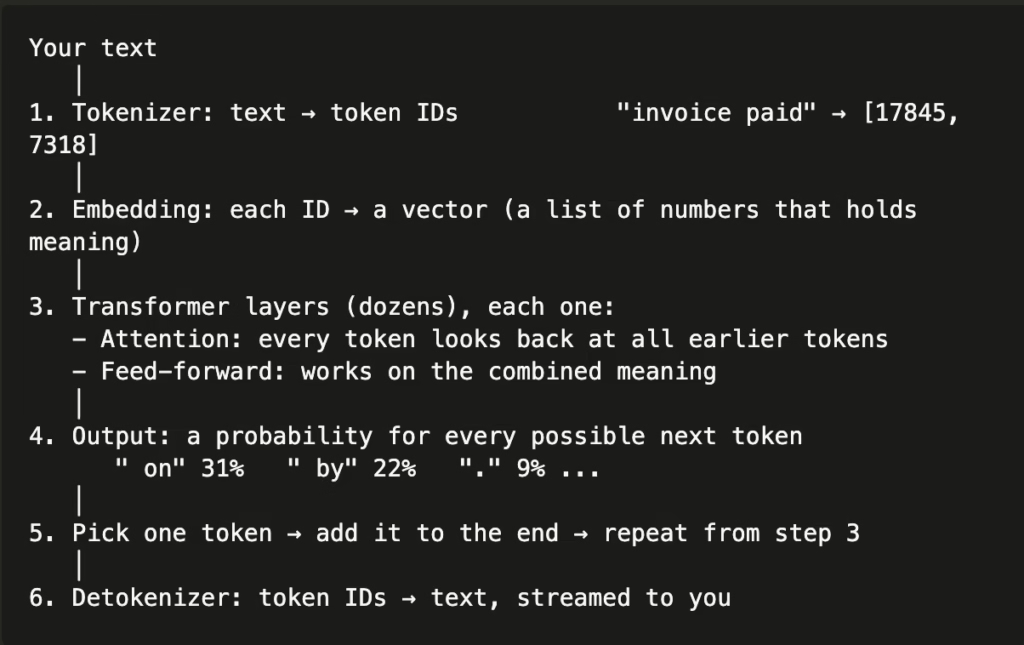
The system that converts raw text into tokens is called a tokenizer. Each model can have its own tokenizer. One thing to note is that for the same input, the same tokenizer will always create the same tokens.
One quick question: does the tokenizer need to be case-sensitive or not?
The answer is yes. A token is made from raw text, and if we don’t make it case-sensitive, it will create problems. Take IT vs it, for example.
Now, as the LLM takes tokens, it will output tokens too. So we definitely need a system to convert those tokens back into normal text. There we use a detokenizer. Below is a workflow diagram of how the whole system works.
One open-ended question from me to you: do the detokenizer and tokenizer need AI?
One small thing before we go further: let’s understand the context window. The context window is the largest context the model accepts, for example 1M tokens. You have probably seen Claude launch models with 1M tokens. That only means how many tokens a single LLM request can hold to generate the output.
How does Claude Code manage tokens in one session?
Now that we understand the basics, we will see how token management actually matters while using tools like Claude Code or Codex. Every time you start a new session, each request is a separate thing. By default, the LLM doesn’t know what the request is about or what tools it can use. All the information needs to be passed to the LLM in each request.
Your skills, memory files, code files and tools all need to be passed to the LLM in each request, so it has the context it needs to generate the output. When you write a prompt on the screen, the whole system looks very simple, but behind the scenes your harness does many things to make requests to the LLM faster.
First is input. As we discussed briefly, input is the set of tokens the LLM needs before doing its magic. In each request, Claude Code sends all the required information to the LLM. Then the LLM processes it and provides the output. This basic model sounds pretty simple. But the more you continue the chat, the more your input size grows, because each request also includes the previous inputs as well as the outputs the LLM generated. So, kind of, the whole session history is also passed.
At scale, the above is not cost-optimized, because each time all the data is fed into the LLM to process. Also, LLMs run on GPUs, so the more high-token requests hit the GPUs, the slower the system can get.
When there are many direct queries on a database, one of the solutions is to add a cache in front of it for repeated requests. The same method is also applied here. It’s called cache reads. 💡
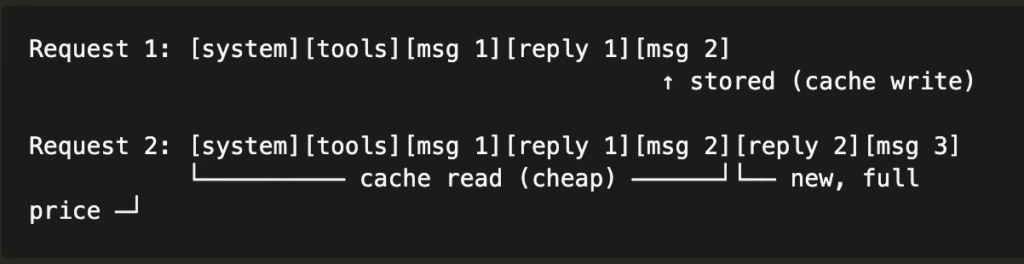
The idea is simple. When you start a new session, the input and output tokens of the first request are stored in a fixed format in the cache. So the next time you add a new chat message in the session, the old stored part is reused, and this is where cost is saved. The server compares the new request with the stored one from the beginning, token by token, and reuses everything up to the first difference.
Again, it also has some limitations and things you need to consider:
- The cache belongs to one model. Switching models starts with no cache.
- It is not shared between users.
- It never changes the answer. It only makes processing cheaper and faster. The model still reads the full history every time.
How does token management work in subagents and branches?
For a single running session, things are simple: you have the context window, context, input, output and cache in place to process the user’s request.
What is a branch?
When you split off a new session with all the previous history of the current session, it’s called a branch. Now, as the prefix, the starting part of your session, is the same, the cache will still be valid. So cost is going to be saved here. Apart from this, it is the same session, only now, with your new chat, the whole session’s information is going to be passed to the agent.
Subagents and multi-agent workflows
In Claude Code, we have a feature to divide the main task across multiple subagents, and each agent processes its own task. Now we will see how token management works in this case. In this case, we will have a main agent/session, and it will spin up multiple subagents. Each subagent will do its task and reply back to the main process/agent, and then the main agent will merge the results as needed.
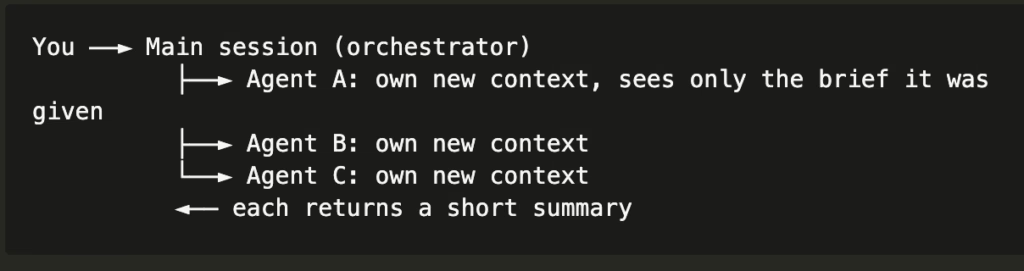
Now, the thing to note here is that each agent will have its own session history, and in each API call it will pass its own input information to the LLM, so its cache will be different. This makes everything costly, as there is no cross-agent cache in use. So if your task just spins up 10 agents, each one will have everything independent of the others.
The above can create issues, as the cost will increase 4–6x based on your subagents. It’s fast, but the cost is also high because of the way tokens are managed.
Why subagents use more tokens:
- Each loads its own instructions and tool list
- Each reads files again that the main session already read
- Each runs its own loop, resending its growing history every turn
Use subagents when the work really splits into independent parts, needs a lot of reading you want kept out of the main context, or needs an independent second check.
There is also a fork subagent, which can use the main agent’s cache: a fork subagent inherits the main context, so its start can be a cache hit. A fresh subagent pays its own cache writes.
So next time you are working in a session and decide let’s 10x the speed with a workflow, make sure you know what is needed and whether it is really needed or not. Unless you have unlimited tokens. 💸
More things worth knowing about tokens and best practices
Adding some more things for your reference, apart from everything we have discussed up to this point.
- Every API request sets max_tokens, the most output tokens allowed. If the model reaches it, the answer stops mid-sentence and the stop reason is max_tokens. A cut-off answer is usually this limit, not the model giving up.
- Reasoning models think before answering. Those thinking tokens are billed as output, even when hidden. An effort setting (low → max) controls how much the model thinks: higher effort is better on hard problems and costs more tokens. Simple tasks usually do well at low effort.
- Besides price, providers limit tokens per minute (input and output) and requests per minute. Parallel agents and huge contexts hit these limits sooner.
- An image is cut into patches, and each patch becomes tokens (often ~1–2K tokens per image). A PDF page is text tokens plus, often, an image of the page. Bigger images cost more.
- Speed is measured as output tokens per second. Typical chat models produce tens to a few hundred tokens per second. The wait before the first token (time to first token) grows with input size, and caching shortens it.
- A model that accepts 1M tokens doesn’t use all of them equally well. Accuracy often drops for facts buried in the middle of a very long context. Put the most important facts at the start or end, and keep the context relevant.
Some of the best practices:
- Be specific. Give what, scope , expected output, and what not to touch.
- Give context once, in the right place. Rules for every session → CLAUDE.md. Facts learned during work → memory. Task details → your message. Keep the always-loaded files short, they are sent on every request.
- Show an example of the output you want.
- One topic per session. /clear when you switch. Save results first.
- Plan before big changes. Plan first, don’t edit yet, or plan mode.
- Use subagents only for independent work.
- Ask for short answers when you don’t need detail, output is paid twice.
Avoid long breaks mid-task in a big session, or expect a full cache re-write.
Byeeee you beatifullll 👋