What are tools in harness?
In today’s post, we will discuss what tools in a harness are. We will take Claude Code as an example to explore how it uses tools with LLMs, how the agent loop works, and how a model like Claude works with a harness to build awesome apps. Let’s get started.
I have written some random posts about how agentic systems work, but it looks like it will end up as a full series starting from the understanding of some must-know things as a developer/vibe coder. Then explore how LLMs use tokens. In this post, we will discuss how a harness uses tools to solve real-world problems with LLMs. Finally, we will build a real-world video generator harness with our own agents and tools.
What are tools?
Assume there is a high-performing car engineer who can perform extraordinarily. But for that engineer’s work to be meaningful, they need different car parts, where each part needs to work in a specific way for the car to run. So all these car parts combined with the engineer make it worth it.
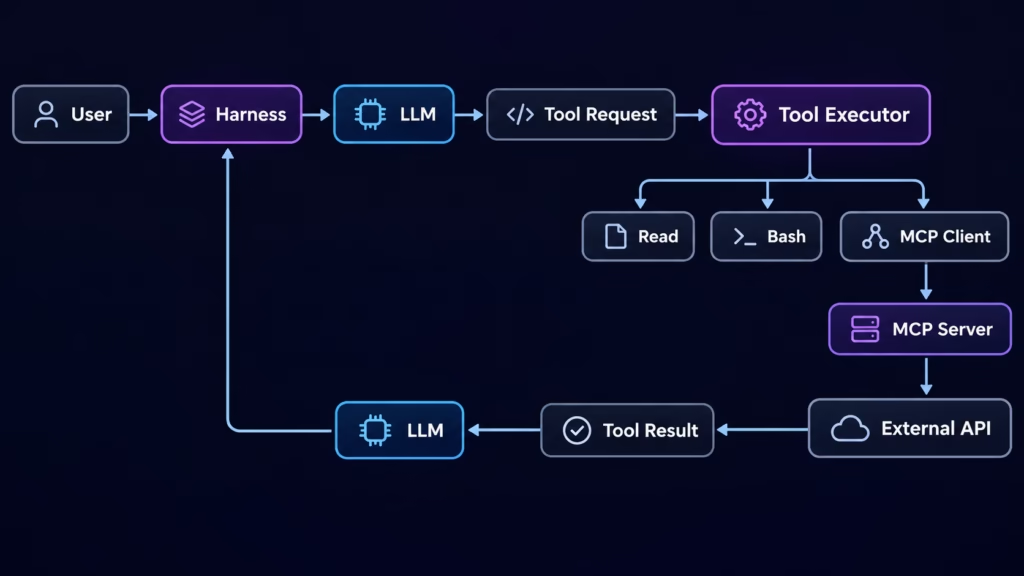
The same concept applies here. LLMs + tools become a complete system which we call a harness. As LLMs only understand text, they will take input and provide output in the same text format. So an LLM can be asked to give a function to send an email. But with tools, it becomes possible to fetch code generated by LLMs, put it in the right place, cross-check whether it’s right or not, and continue this process until it’s done.
In simple terms: A tool is an action the harness offers to the model.
Mainly, each tool has three parts. For this, I have taken Claude Code as an example, but this can change depending on your harness. As LLMs just need text as input, it’s up to the harness how it needs to handle tools.
- Name: Read
- Description: Reads a file from the local filesystem. Supports absolute file paths and optional offset and limit parameters.
- Input Schema (JSON): {…}
What are Agent Loops?
In the real world, solving any problem in software or building something is a continuous process. Like start building, check what you built, again build/fix things if the result is not up to the mark, and continue this until you get what you need. The same method is also used in a harness like Claude Code. It runs the loops until LLMs tell the output is okay as per the LLM’s understanding for a given task. These loops are called agent loops.
For example, let’s say you ask Claude Code to make a function to send an email. So the harness will start the process by sending a request to Claude. It will ask for some files/folders to read from a tool, the tool will read them by running some commands, send that output to the LLM, and then the LLM will take input, generate the code, and send it back. This process will continue until the LLM says, “Bro, this send email will send email, and it’s done.”
In simple terms, here is the agent loop:
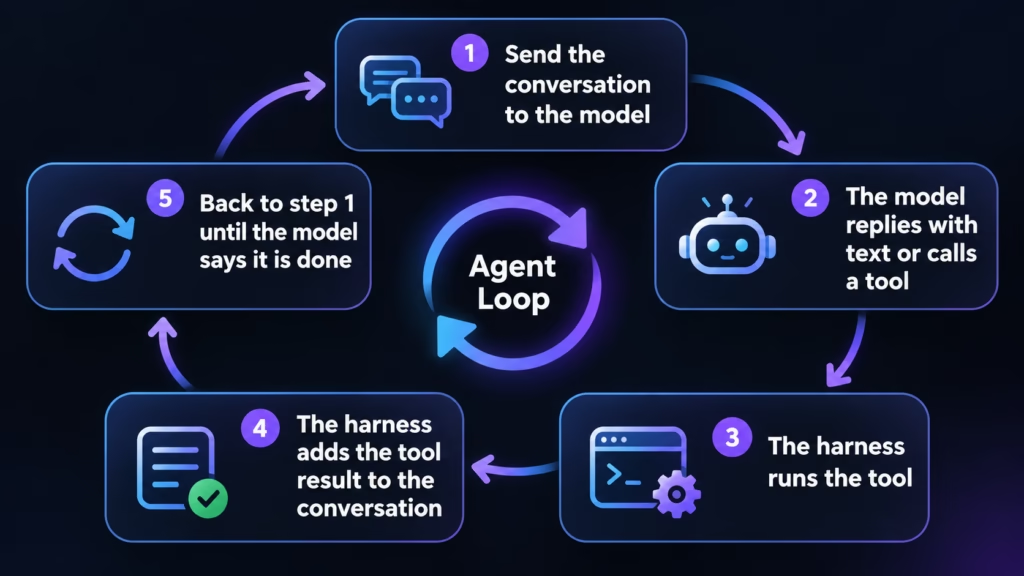
Now here you will understand what effort is used in Claude Code. Like the higher its value, the more time the model will take to understand the output, and it will think more to end the loop to say this output is okay.
Let’s discuss some of the most common tools that come with any harness. We will discuss two main tools and then cover some additional Claude Code tools.
Web search
LLMs are trained on a fixed set of input data. So the knowledge they have is what was fed into the LLM during its training. Therefore, predicting something new or getting information outside its training scope is not possible. But nowadays, harnesses provide a web search feature to LLMs that allows them to fetch new data and make decisions based on it.
Let’s say you ask the model to find today’s live match score and the winning team’s name. Now, if the LLM was trained even a day before yesterday, it will never have data on today’s live match. So there are tools in a harness that allow LLMs to perform web searches to fetch data.
The flow looks like something like this:
- LLM got input: Find the score of today’s live match between team X vs team Y
- LLM returns: WebSearch(…)
- WebSearch returns the information of the match in the form of raw text and links. Again, this part depends on the harness and how it needs to handle it
- LLM: got the live match info in raw text
- LLM: Formats the information as requested by the user and returns the result
And just like that, even if your LLM is not trained on today’s data, it is able to answer your query.
This simple hack makes LLMs so powerful; now the LLM doesn’t need to be up to date with all information—instead, it can simply do a web search and find what you need for a specific problem. THIS MAKES ANY harness you build next-level powerful.
In Claude Code, we have two tools to do this: WebSearch and WebFetch. WebSearch is used to search website links based on user input, and WebFetch is used to get the content of a website link in raw text.
One thing to know is that this runs on Claude’s own server, and it uses the LLM to get raw text, so its cost can depend on how complex your search is.
MCP
Up to this point, your harness has a loop that can handle complex work with multiple tools, and it has web search to provide new information to the LLM. Next is to provide 3rd-party integration to LLMs. Let’s say you need to make sure your harness builds a YouTube video and pushes that to YT on its own.
One way to do this is to just ask the LLM to understand YouTube APIs, auth methods, and build a small skill/script that it can run again and again to upload videos for you. Now this works great here—you don’t even need something else to make 3rd-party integrations to any other tool, as you can just ask the LLM to build integrations and use them everywhere. But now for each integration, there are just as many issues. Not all 3rd parties will have the same API schema, auth, and response format for your query. So the LLM needs to handle each integration differently and understand each one separately. So simple API reading/integration at scale will make things difficult, which is where MCP comes in.
MCP (Model Context Protocol) is an open standard for connecting AI apps to tools and data. Comparison: before USB, every device had its own cable. After USB, any device works with any computer.
Lol above is an AI-generated definition, but in simple terms, MCP is an API-type format for LLMs. So as an LLM, I don’t need to understand how the YouTube API works or how the Google Drive API works. I just know an MCP server for the YouTube API, which provides me with X tools; I will provide input to it, and it is going to respond to me with a fixed format/standard as per MCP. Now for Google Drive, again as an LLM, I just need to know the MCP name, and other things are again the same for me—behind the scenes how it works, I don’t care. This solves the issue of LLMs understanding many different APIs and making integrations on the fly as per need.
Now we just need an MCP server for a given 3rd-party integration, and just like that, it can be part of any harness that needs your MCP.
One question: If a harness like Claude Code also provides tools to run CLI commands like curl, why is MCP needed? For example, for Google Drive, can’t you simply use rclone? So why is MCP needed?
The answer is that MCP tools depend entirely on how your system needs to use them. Not everything will have a CLI available at all times for you to use. However, if a GitHub CLI exists, it is often better for the LLM to generate commands for it if the CLI is installed on your system. Why would you need a different server to perform the same operations? It always comes down to what best solves your problem, and you can use whichever approach fits best.
Above both are the most important tools in any harness in my view. Apart from this, it’s up to you what different tools your harness needs. And based on that, you can build tools. Now we will see some more Claude Code tools which it provides as a harness.
More Claude Code tools
Files and code
- Read: read a file (also images, PDFs, notebooks)
- Write: create or fully replace a file
- Edit: replace exact text in a file
- NotebookEdit: edit Jupyter cells
- Glob / Grep: find files by name, search inside files
- LSP: language-server features such as go-to-definition
Shell
- Bash: run any terminal command; can run in the background
- Monitor: wait until a background process meets a condition
- TaskStop: stop a background task
Agents and orchestration
- Agent: start a subagent (Explore, Plan, general-purpose)
- SendMessage / ListAgents: talk to running agents
- Workflow: a script that runs many agents in a fixed order
Planning and the user
- AskUserQuestion: ask a multiple-choice question
- EnterPlanMode / ExitPlanMode: plan first, get approval, then change things
Scheduling
- CronCreate / CronList / CronDelete: run a prompt on a schedule
- ScheduleWakeup: resume later (used by /loop)
Isolation
- EnterWorktree / ExitWorktree: work in a separate git worktree
Extensions
- Skill: load a packaged set of instructions
- ToolSearch: load a “deferred” tool’s full definition only when needed
Above are only a few examples, and again, I just asked Claude Code. You can also ask and learn something new about how it uses all the above to make an awesome coding harness. So now you know, next time you start building your own harness, what things it needs to do. Tools are always your choice, so based on your needs, you can decide what you need and what is best for your system.
Bye, happy agentic coding (-_-) …..